


git clone https://github.com/<my_username>/<fork>.git
git status
git log
git hist
q exit log/hist
git remote -v
git remote add upstream git://github.com/<user>/<repka>.git
git branch <branch_name>
git checkout <branch_name>
git add <file_name>
git commit -m "<comment>"
git push -f origin <branch_name>
gitk Continue reading
Git-sheet
Posted in Git (en)
Leave a comment
What is, who is? Web project leader and manager.
The delightfully sly thief of other people’s thoughts, and no less charming vampire puppeteer, now lives at this address.
Welcome!
Here you will find information about everything related to the difficult profession of a manager, administrator, web project manager.
Posted in Uncategorized
Leave a comment
phpBB: how to add banner to the header
Fast tutorial for clickable adaptive (for mobiles) banner to phpBB forum header without plugins (past phpBB extension which I used for banner was vulnerable and spoiled security at my forum):
- Go to /styles/prosilver/template/overall_header.html
- Right after
<!-- EVENT overall_header_headerbar_before -->
add:
<center><a href="LINK_WHERE_BANNER_MUST_LEAD" target="_blank"><img width="100%" src="LINK_TO_THE_PICTURE"></a></center>
for example:
<center><a href="https://www.labirint.ru/books/822167/?p=33449" target="_blank"><img width="100%" src="https://vidforum.ru/images/icons/book.jpg"></a></center> - Now clean cache – delete folder: cache/production/twig
- Enjoy your banner! It will be adaptive, which means that it will be shown on mobile devices in proper proportions.
Hope to see your comments! 🙂
Posted in CMS (en), phpBB (en)
Leave a comment
How to strip date / time in Notepad ++ (regular expressions)
The task is to remove the date or time in the log file, for example, this:
[11:33] hello
[11:35] how to replace timestamp with a space?
[12:16] probably this can be done using regular expressions
[12:44] I tried period (.) But nothing comes out
[15:12] how to remove numbers from the log?
To do this, we turn to the (my favorite) Notepad ++ editor which is free and open-source.
Posted in Notepad++ (en)
Leave a comment
X11 color chart in correct order
Table’s description can be found at the bottom of the page.
Continue reading
Posted in Design (en)
Leave a comment
Best hotkeys for Windows OS
cd\ cd to c:\
alt+drag’n’drop to create shortcut.win+d– show/hide all opened windowswin+e– open “My computer”win+r– “Run” window toggle- choose the file and press
F2– rename 😉
*button Win you can find between Ctrl and Alt. Also to show “Start ” menu you can push Ctrl + Esc
Alt + Tab – switch windows
Alt + F4 – close active program
Alt + Enter – view properties of selected object
Ctrl + w – close 1 window of program (eg, photoshop project or browser tab)
Tab – go to another element of the interface (useful, when mouse doesn’t work)
F5 – refresh window of the active program (eg, browser)
Ctrl + F5 – reload active window (totally)
F11 – expand active window on the whole screen (useful for presentations).
Ctrl + F – search
Ctrl + N – create new document in active program (word, photoshop, etc)
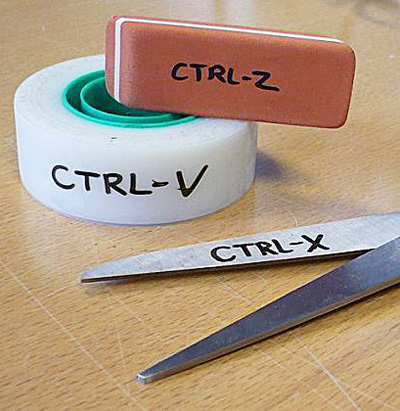
Ctrl + C – copy
Ctrl + X – cut
Ctrl + V – paste
Ctrl + A – select all
Ctrl + Z – undo
Ctrl + Y – redo
Ctrl + S – save
Ctrl + Home – move to the beginning
Ctrl + End – move to the end
In office programs – selected text fragment will become…
Ctrl + I – italic
Ctrl + B – bold
Ctrl + U – underscore
Ctrl + Shift+A – make all letters as capital
(html tip: to make text crossed out – use <s>text</s>
Important hotkeys for Photoshop:
Ctrl + t → ctrl + 0 – change size
select+space – move selected
[ ] – size of the brush tool
Alt + R – show rules
Alt + H – show guides
Please write your favorite and useful keyboard shortcuts below in the comments!
Posted in FAQ (en)
Leave a comment
C++ Builder “Community Edition EULA Reminder”
I use for development C++ Builder Community Edition which is very nice IDE. In past update of C++ Builder Community Edition (from 10.3 to 10.4) there is a problem appear: every time when I compile the code I get pop-up window: “Community Edition EULA Reminder”:
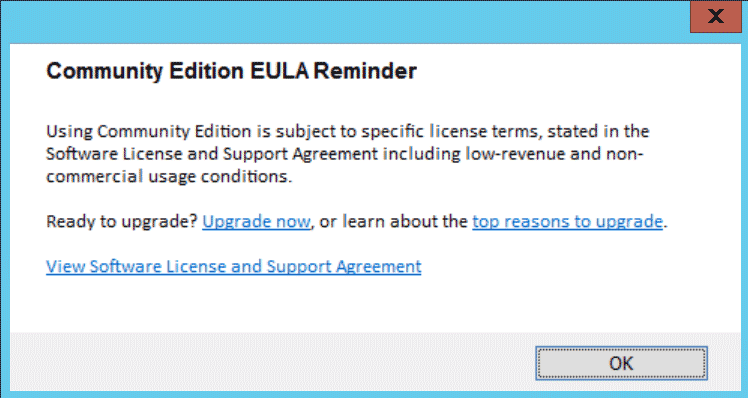
Apparently this promp appears if project got > 70000 lines of code (with comments). This is quite tediously to click it every time when I compile my non-commercial project…
I wonder why Embarcadero did this.. There are plenty of other IDE’s without such stupid prompt. I’m pretty sure that this reminder actually reminds programmers that maybe they should port their project to another IDE?..
Gmail lifehack: dots in email
A funny (and quite important) thing that very few people know: the dots in the email on gmail.com does not matter. Therefore, these addresses:
vasia.pupkin@gmail.com
va.sia.pup.kin@gmail.com
v.a.s.i.a.p.u.p.k.i.n@gmail.com
… are the same: vasiapupkin@gmail.com
This is sometimes used by scammers, because emails with dots which are not hosted on gmail are considered as different ones. Be careful!
Posted in Uncategorized
Leave a comment
[solution] Photoshop turn off grid default
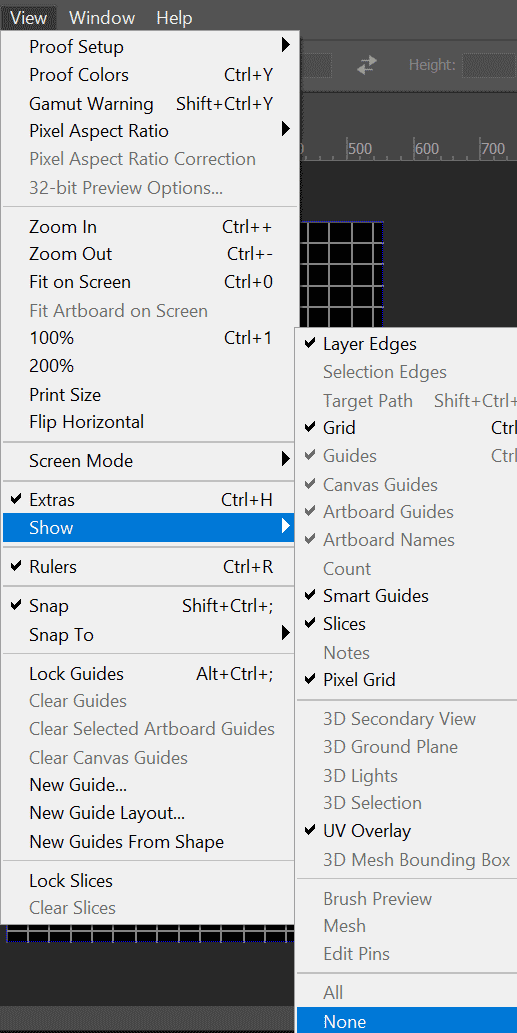 I’ve noticed that every time when I open Photoshop – it has grids turned on by default and each time I had to hide it by pressing
 Ctrl+h. Finally I found solution:
Go to top menu and find there:
View → Show → None
(see the picture to the left)
Now restart Photoshop and you won’t see the grid anymore.. Finally! 😀
Posted in Photoshop (en)
Leave a comment
PHP: simple MySQL database query, form and button
Getting started with databases in PHP can seem daunting if you’re trying to eat an elephant right off the bat and making queries that are overly complex. Let’s start with the most basic simple database query to understand the general principle. A working code that can be copied is at the end of the post.
Examples:
1) output and print one value from the MySQL database in PHP, in our example we will extract the name of the seventh player;
2) make a form on the site (drop-down list) with a button to send the selected value from the form to the program and get the necessary data from the MySQL database.
C language: implicit type conversion example
One of the most hardcore stuff in C language is implicit type conversion. If you don’t watch for it – you will be in big trouble. Take a look at this code:
#include <stdio.h>

int main (void)
{
int a = -10;
unsigned int b = 5U;
long int c = a + b; // signed + unsigned

printf ("1) (signed int)a -10 will look as unsigned like this: %u\n", a);

printf ("2) (signed)a(-10) + (unsigned)b(5) = %ld\n", c);

return 0;
}
Implicit type conversion ranks:
bool
 char
  unsigned char
   short int
    unsigned short int
     int
      unsigned int
       long int
        unsigned long int
         long long int
          unsigned long long int
           float
            double
             long double
Posted in C language (en)
Leave a comment